Free Mac cleaner for the menu barReclaim disk
space. Safely.
A native menu-bar cleaner for macOS. Scan 9 categories and review the results before manual cleaning. By default, selected Downloads go to the Trash; selected caches and logs are removed permanently. Free, with no account.
Free · no account · no subscription
See it in action.
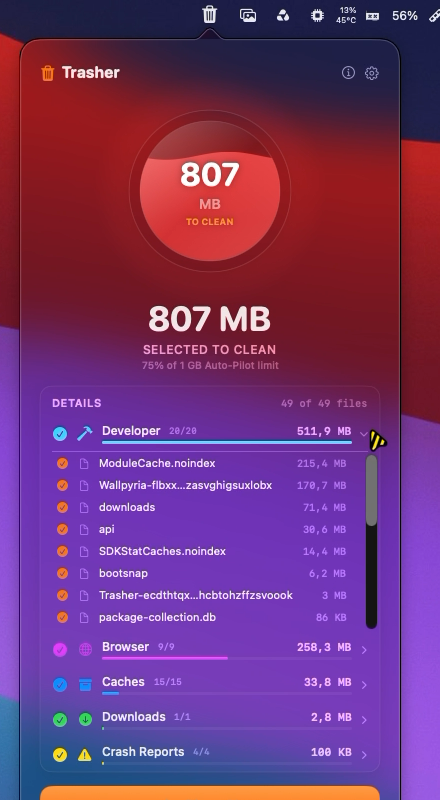
Trasher lives in your menu bar. Click the icon, scan, and clean — the whole flow is one popover.
Size ring vs. your Auto-Pilot limit, per-category breakdown, file lists
Two minutes, one take.
Scan, review, clean, rules and Auto-Pilot — recorded on a real Mac with real files, no cuts.
Everything you need.
A complete cleaning toolkit with native macOS integration, built from the ground up in Swift.
Smart Scan
The scan engine checks 9 categories in the background and updates the results as it finds files. Scan time depends on the number and size of files.
Auto-Pilot
When enabled and Trasher is running, Auto-Pilot checks on a daily, weekly or monthly schedule. If the junk reaches your threshold, it cleans caches, logs and temp files and sends a notification. It never touches Downloads or the Trash. The schedule is saved across restarts.
Honest Cleaning
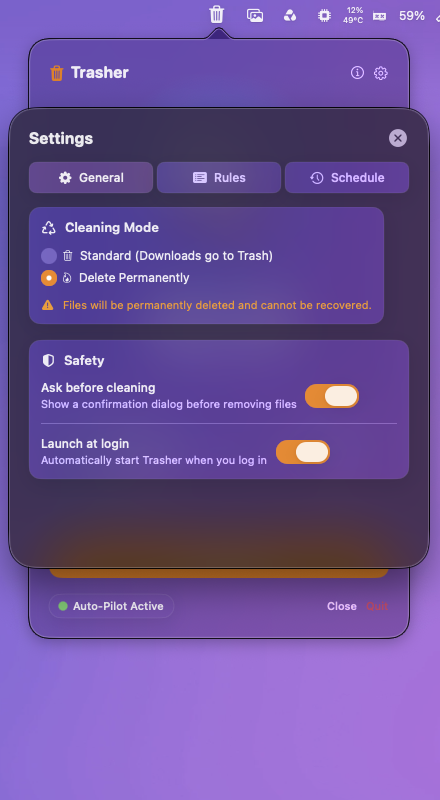
In the default mode, selected Downloads move to the Trash. Selected caches, logs, temporary files and build junk are removed permanently; moving them to the Trash would not free space. Delete Permanently also removes selected Downloads without using the Trash.
One Popover, No Windows
A native SwiftUI popover in the menu bar — a live ring showing junk against your Auto-Pilot limit, a per-category breakdown with file lists, and per-file selection. Click the icon, scan, clean, done.
Custom Rules
Build your own cleaning rules from file extensions, folders and file age. Target exactly the junk you care about and leave everything else untouched.
Scheduling
While the app is running: daily, weekly or monthly checks, with automatic cleaning above your threshold.
Custom Rules
Add your own cleaning rules — file extensions, folders and file age.
Launch at Login
Auto-start via macOS Service Management. One toggle in settings.
Confirm Before Clean
Optional confirmation dialog before anything is removed. On by default.
9 categories. One scan.
Trasher knows exactly where macOS hides reclaimable space — and shows you each pile before you touch it.
Caches
App & system cache files that pile up silently
Logs
Diagnostic logs you never read
Downloads
Installers and archives left in Downloads for over a week (.dmg, .pkg, .zip…)
Trash
Items already in the bin
Browser
Safari, Chrome, Firefox, Edge, Brave, Opera & Arc caches
Temp Files
Stale temporary files left behind
Developer
Xcode DerivedData, simulators, npm, Homebrew, Cargo, Gradle…
Cached attachments and mail downloads
Crash Reports
Diagnostic crash dumps & spin reports
A free CleanMyMac alternative.
Trasher covers the everyday cleanup part of a Mac cleaner: caches, logs, old installers in Downloads, the Trash, browser caches, temporary files, developer build junk, Mail downloads and crash reports. It does not uninstall apps, find duplicate files, scan for malware or optimize memory. It is free, with no account and no subscription.
Safe by design.
See what the scan found, choose what to remove manually, and decide whether Auto-Pilot should clean automatically.
Real Deletion, Recoverable Downloads
In the default mode, selected Downloads go to the Trash. Other selected categories are deleted permanently to free space. The optional Delete Permanently mode also bypasses the Trash for Downloads.
See Before You Clean
For manual cleaning, inspect the category breakdown and select what to remove. Auto-Pilot cleans automatically only when you enable it and its threshold is met.
Protected Paths
Documents, Desktop, Pictures, mail stores, keychains, preferences, SSH keys and system folders are excluded by protected-path rules. The scanner checks delete permission before listing candidates, though an individual removal can still fail.
Confirm on Demand
Keep the confirmation dialog on for a final check before each clean, or switch it off once you trust the flow.
Privacy First
Scanning and cleaning happen on your Mac. Trasher has no account or analytics; settings are stored locally in UserDefaults.
- Zero data collection
- Scan results stay on your Mac
- No sign-in to scan or clean
- No license keys, no activation
Native Performance
Built with Swift, SwiftUI and AppKit. Scanning runs off the main thread, so the menu-bar interface can continue showing progress.
- Background scan engine, live progress
- Never blocks the main thread
- Tiny menu-bar footprint
- Universal: Apple Silicon and Intel
Yours Forever
Trasher is free. No trial clocks, no license keys, no subscription — download it and it is yours.
- 100% free
- No account, no activation
- All your Macs
- Free updates from this site
Get started.
Install Trasher, review a scan, then choose what to clean.
Requirements
Installation
Apple's guide to opening apps from unidentified developers ↗
Trasher 1.1.2 · Free · ~3 MB · zero telemetry · no account
Signed with Apple Developer ID, notarized by Apple.